Most of us run git add and git commit every day without thinking about what happens underneath. This post looks inside the .git/ folder to see how git actually stores your work.
Every object git stores, blob, tree, or commit, is named after the SHA-1 hash of its own contents.
What is Git?
Git is a distributed version control system: it tracks changes to your files and lets you collaborate with others on the same project. Linus Torvalds created it in 2005 to manage development of the Linux kernel. It’s written mostly in C, with some python, shell, Perl, and Tcl.
Exploring git
To start, I’ll create a git repo named test/.
git init testcreates a local repo namedteston the machine, containing a.git/folder with all the metadata.
drwxr-xr-x 3 hackerman hackerman 4096 May 31 17:48 . drwx--x--x 71 hackerman hackerman 4096 May 31 17:49 .. drwxr-xr-x 7 hackerman hackerman 4096 May 31 17:49 .git This post focuses on objects and refs, the two most important parts of the .git/ directory.
.git ├── branches ├── config ├── description ├── HEAD ├── hooks │ ├── applypatch-msg.sample │ ├── commit-msg.sample │ ├── fsmonitor-watchman.sample │ ├── post-update.sample │ ├── pre-applypatch.sample │ ├── pre-commit.sample │ ├── pre-merge-commit.sample │ ├── prepare-commit-msg.sample │ ├── pre-push.sample │ ├── pre-rebase.sample │ ├── pre-receive.sample │ └── update.sample ├── info │ └── exclude ├── objects │ ├── info │ └── pack └── refs ├── heads └── tags 9 directories, 16 files How git actually works
Git works with three areas: the working directory, the staging area, and the local repo. git add snapshots the file you’re working on and puts it in the staging area. git commit then saves that snapshot permanently in the local repo.
What happens when you run git add <filename>
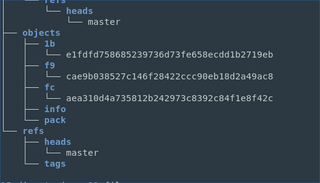
git add takes the file from the staging area and saves a copy under the objects directory. Git represents the file as a blob (binary large object), and names it using a SHA-1 hash calculated from the file’s contents.
In this case, the blob is f9cae9b, and you can see the object with git show --pretty=raw f9cae9b.
What happens when you run git commit <filename>
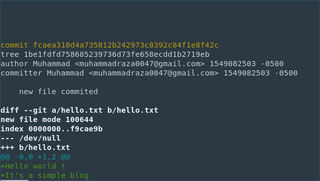
git commit takes the file from staging and saves it as a permanent snapshot in the local repo. It also creates two more objects: a tree and a commit.
Here, the tree is 1be1fd:
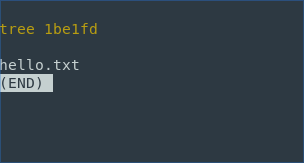
And the commit is fcae310. Notice that the commit also points to a tree, which represents the directory structure:
Running git ls-tree <tree> shows more about the tree and what kind of files it contains:

So the tree contains a file named hello.txt, represented as the blob f9cae9b. Git also tracks file permissions, shown here as 100644. When you rename a file, git doesn’t delete the raw data: it creates a new tree instead, so you can rename files without losing history.
Besides objects/, .git/ also has a refs/ directory, which holds your branches. A branch name is just a reference to a commit: it stores a SHA pointing at that commit, and git updates it automatically every time you commit.
That’s how git works under the hood. It builds all of this on a data structure called a Directed Acyclic Graph, which is worth reading up on if you want to go deeper.
If you think I missed anything, feel free to DM me on twitter. Feel free to share this with friends and colleagues.