Someone on Reddit shared a prompt for making animated explainer videos with Claude. I tried it with a topic I know well, Docker containers. I pasted it into Claude Code, put in an API key for the voice and music models, and left my desk.
When I came back, there was a finished 57-second film. Claude Opus 5.5 had written the script, drawn every frame in code, directed the narration, edited the music, synthesized the sound effects, mixed it all, rendered the video, and had it reviewed by a second model. The whole run took 38 minutes. The paid API calls cost $0.15.
There are no image files in it. Every paper texture, torn edge, character, and prop is drawn by JavaScript on an HTML canvas.
The film is good, but it wasn’t what impressed me most. That was the session log. The model cannot hear, and it cannot watch video. It still shipped a clean mix and caught two factual mistakes in its own draft, because it found a way to check every step. That is most of what this post is about.
A model that cannot hear still produced a clean mix, because it measured every sound instead of trusting it.
The prompt
This is the prompt as I sent it, minus the API key. The only part I wrote was the topic.
Create a pure javascript animation. 30s-60s stop motion paper craft style video
with appropriate audio on the topic what is docker containers and how they work

Entire video should be as high of a production value as possible. Please spend
your time on this, it's very important.

Use high quality text-to-speech model for generation. You can find open router
API key in .env file

You can use any tools you can find access to and resources on the internet. You
create the script, the assets, the animation, concept, everything.
I have to go away from my computer so please work autonomously until done.
Quality is paramount. Production value should be on professional level.

One more thing: max OpenRouter spend is $6.99
It’s a loose prompt, and I think that’s why it works. “Pure javascript animation” picks the medium, so the model needs a browser and nothing else: no image generator, no video model, no design tool. “You create everything” hands over every creative decision. “Work autonomously until done” means it shouldn’t wait for me, and it didn’t. It made 75 tool calls and asked zero questions. The spend cap turned out to matter more than I expected, and I’ll come back to it.
What came back
The film opens on a paper developer at a desk. The laptop says “It works on my
machine!” The app hops over to the server, where Python is the wrong version, a
library is missing, and a setting nobody wrote down is absent, so it tears in
half. Docker’s fix is to pack the app and everything it needs into a shipping
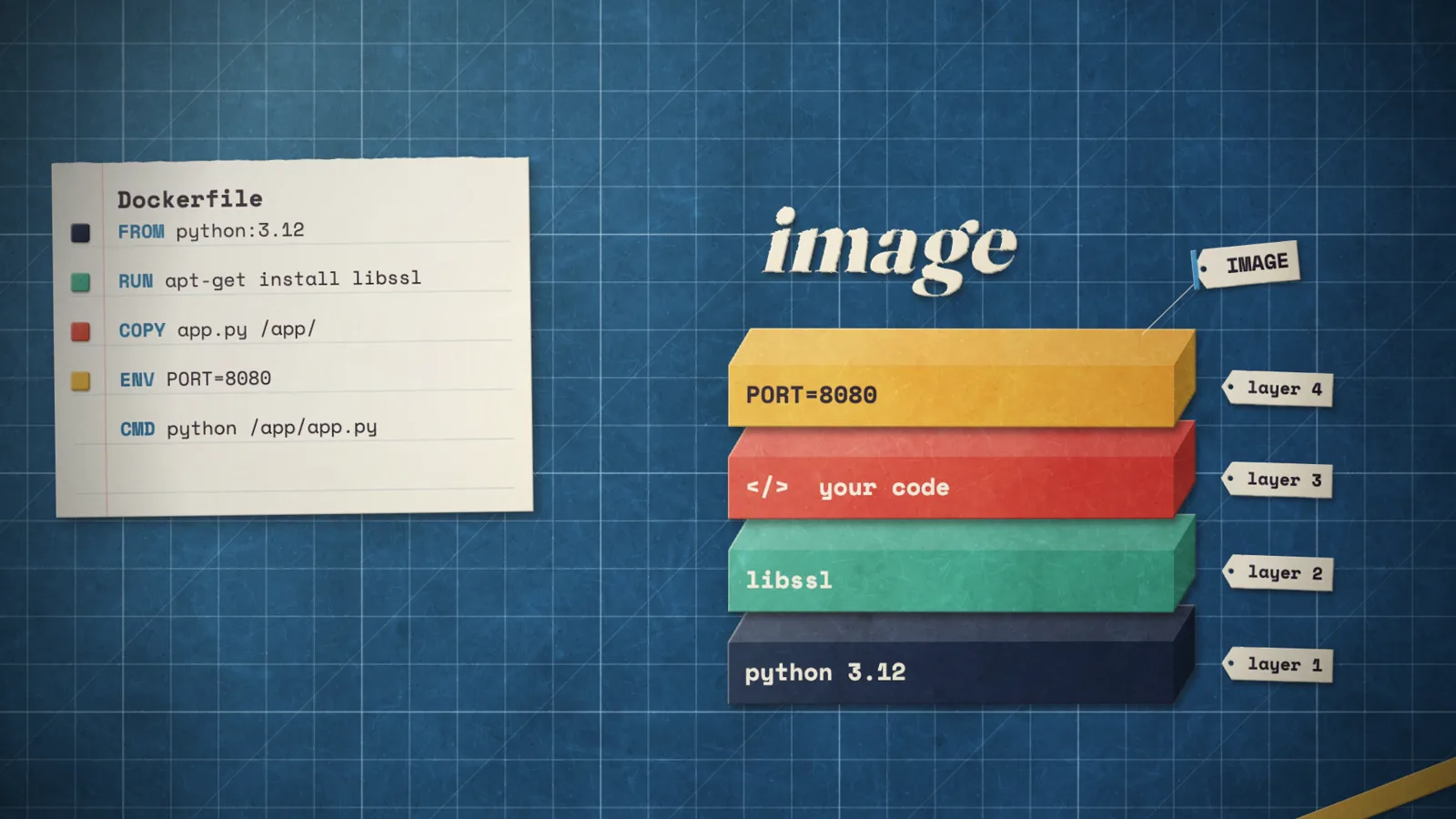
container. From there it walks through an image built in layers from a
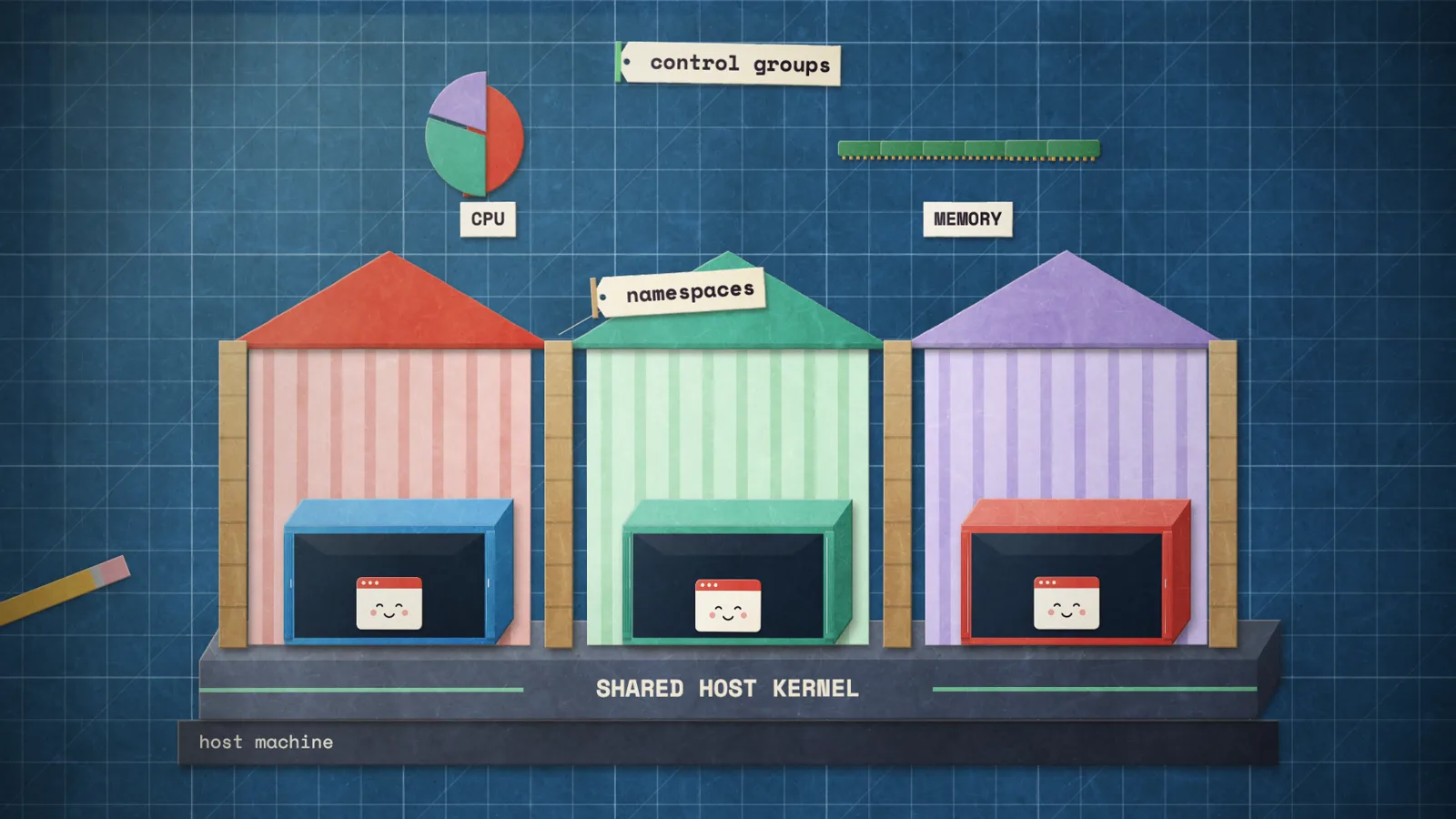
Dockerfile, docker run stamping out identical containers, containers sharing
one host kernel, namespaces and control groups as walls and resource shares, and
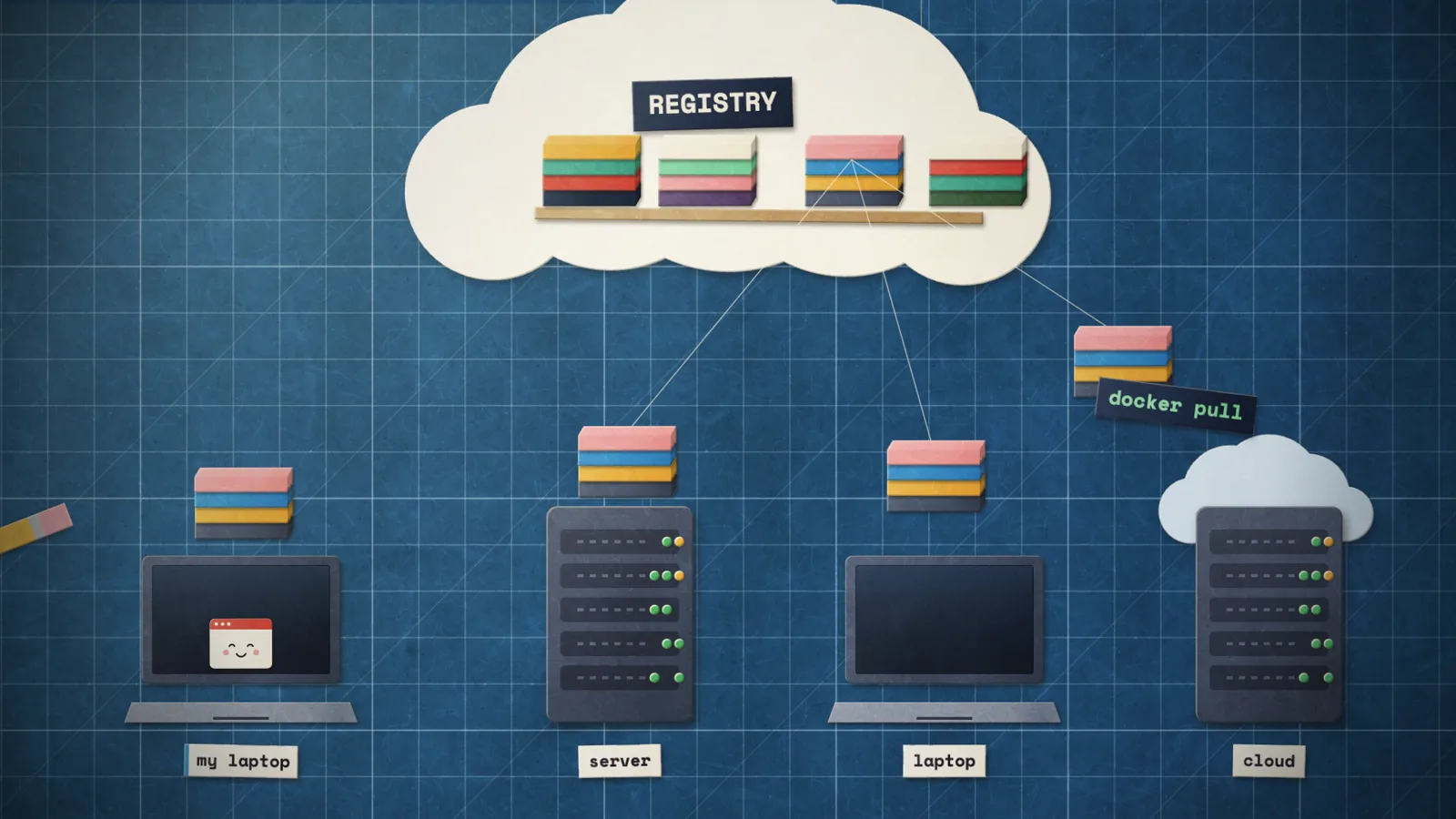
a registry that every machine pulls from. It ends with a paper whale carrying
the containers under the title.
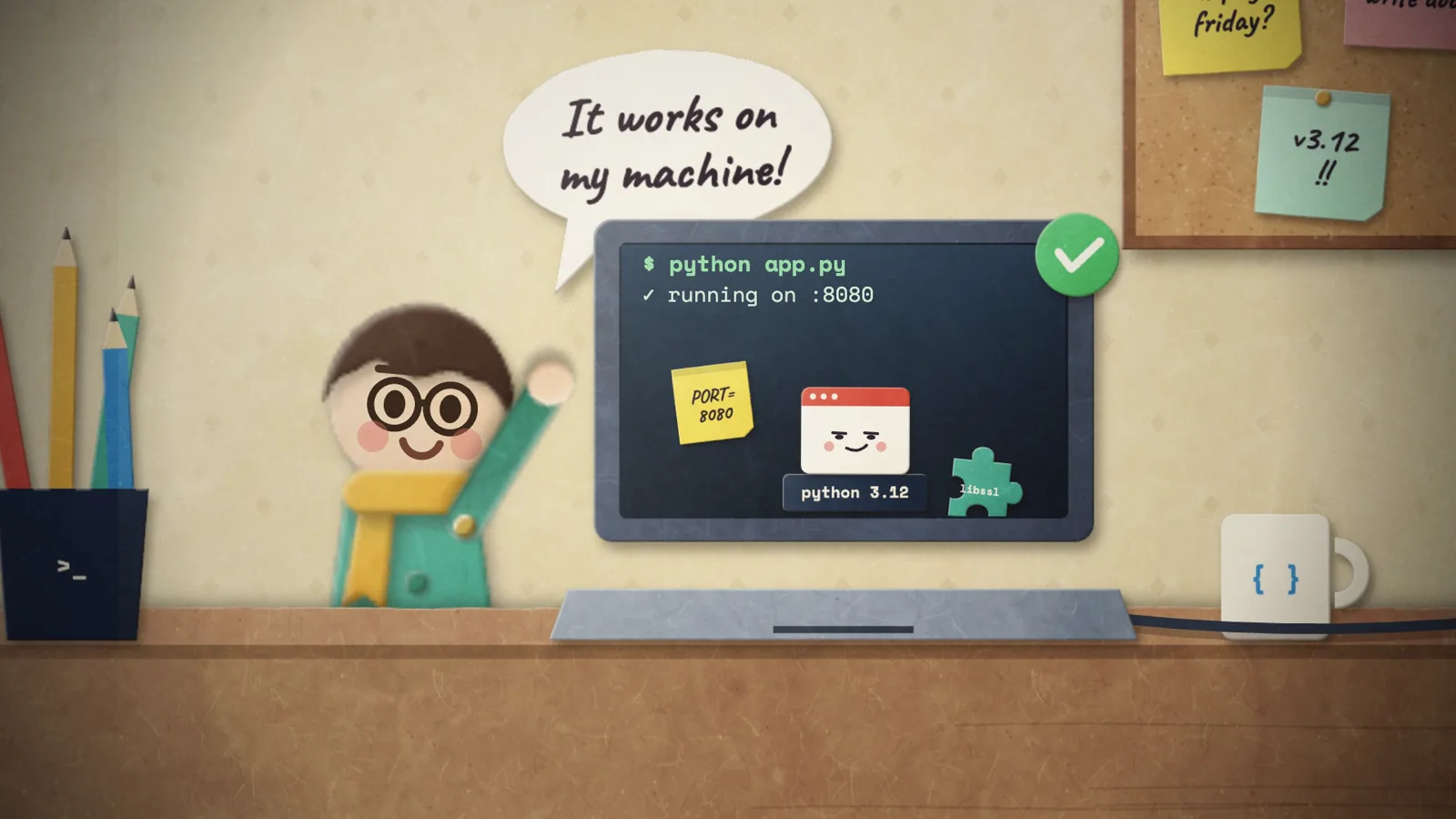
When I read the session log afterward, the order of work surprised me. I expected it to start drawing. Instead, the first thing it made was the narration. It wrote a 12-line script, recorded a test take, checked it, recorded two more, and locked the exact second each line would play. Only then did it generate music, and only after the music was cut did it start on the picture. The drawing took about 15 of the 38 minutes. The rest was sound, checking, and rendering.
How the paper look is made
The whole film is one HTML page. A single function, renderFrame(ctx, t), draws
the complete frame for any time t: it finds the scene that owns that moment,
draws it, then adds a vignette, a slight exposure flicker, and film grain.
Paper sprites
Every paper piece is drawn once at startup into its own offscreen canvas. The
paper() function fills a shape with flat color, lays a paper grain over it,
adds soft light from the top left, and then cuts a bevel: a copy of the shape
offset by 1.6 pixels catches light along one edge and falls into shade along the
other. That bevel is what makes a flat shape read as a piece of card with
thickness. The grain is generated too, as layered noise with 1,500 short
“fibres” drawn on top, so there is no texture file.
Scissors never cut a straight line, so no shape is clean. wobble() walks
along each edge of a polygon and nudges points in and out with noise that
drifts instead of jumping:
// hand-cut wobble along a closed polygon (scissors are never perfect)
P.wobble = function (pts, seed, amp = 1.2, step = 14) {
  const R = P.rng(seed), out = [];
  let d = 0;
  for (let i = 0; i < pts.length; i++) {
    const a = pts[i], b = pts[(i + 1) % pts.length];
    const len = Math.hypot(b[0] - a[0], b[1] - a[1]), n = Math.max(1, Math.ceil(len / step));
    const nx = -(b[1] - a[1]) / (len || 1), ny = (b[0] - a[0]) / (len || 1);
    for (let k = 0; k < n; k++) {
      d = d * 0.6 + (R() - 0.5) * amp;   // drift, not jitter
      const u = k / n;
      out.push([a[0] + (b[0] - a[0]) * u + nx * d, a[1] + (b[1] - a[1]) * u + ny * d]);
    }
  }
  return out;
};
All randomness comes from seeded generators, so a container door has the same ragged edge in every frame.
Making it feel like stop motion
Stop motion has two tells. The picture moves in steps, not smoothly, and every piece shifts slightly between shots because someone’s hand put it back. The code fakes both.
Time is snapped to 12 drawings per second, and each drawing is shown twice in the 24 fps video. Animators call this shooting “on twos”.
P.FPS = 12;
P.step = (t) => Math.floor(t * P.FPS + 1e-6) / P.FPS;  // quantize to the grid
P.frameOf = (t) => Math.floor(t * P.FPS + 1e-6);
Then every piece gets a tiny offset that changes on each drawing. It comes from a hash of the drawing number and a piece ID, so it looks random but renders the same way every time:
P.jit = (frame, id) => P.hash(frame, id) * 2 - 1;  // [-1, 1], new each drawing

P.drawJ = function (ctx, sp, x, y, r, s, f, id, amt = 1) {
  P.draw(ctx, sp,
    x + P.jit(f, id) * 0.9 * amt,          // under a pixel of drift
    y + P.jit(f, id + 0.5) * 0.9 * amt,
    (r || 0) + P.jit(f, id + 0.25) * 0.006 * amt,
    s || 1);
};
Less than a pixel of movement sounds like nothing. I was surprised how much it does. Without it, the film looks like vector animation. With it, it looks like someone sat at a table moving bits of paper.
Motion itself is plain keyframes with easing. These two lines are the container doors swinging open and slamming shut, and the image layers pulling apart with a small overshoot:
const open = K(T, [[14.2, 0], [14.42, 1, 'out'], [15.4, 1], [15.62, 0, 'in']]);
const gap = K(T, [[20.36, 0], [20.66, 38, 'back'], [21.5, 38], [21.8, 0, 'inOut']]);
Because T is already snapped to the 12 fps grid, even these smooth curves come
out in steps. The developer is a set of jointed paper parts held with “brass
split pins” and posed by rotating each part on its pin, like a real paper
puppet.
Sound from a model that can’t hear
Early in the session, Opus 5.5 wrote: “I cannot listen to audio.” It then designed every audio step around that.
The narration comes from Gemini 3.8 Flash TTS through OpenRouter. The model didn’t send the bare script. It wrote a voice director’s brief in front of it, down to the delivery of single lines:
# AUDIO PROFILE: The Explainer
A warm, clever science-show host in their thirties. Bright, friendly, quietly
witty. A real human voice actor, not an announcer.
...
Beats: The first line, "It works on my machine.", is a smug, sing-song
impression of a proud developer. A comic drop on "and breaks." ...
A playful, knowing question on "So... does it work on your machine?"
It recorded three takes and ran each one through faster-whisper on my machine.
The word timestamps from that transcript told it exactly where each sentence
starts and ends, which it used to cut the best take into lines and place each
one in a timeline.json:
{ "id": "breaks", "src": "ach_0", "in": 5.94, "out": 6.55, "at": 7.0,
  "text": "and breaks." }
Every scene was then animated to those times. The picture follows the voice, which is how a human editor would do it.
The music is one 60-second cue from Lyria 3 Pro. The prompt asked for a precise structure: a cocky riff for the first seven seconds, a collapse when the code breaks, an “aha” at 12 seconds, a button ending. Lyria didn’t hit those times. The model handled that with two tools. It sent a small MP3 of the cue to Gemini Flash and asked for a timed list of sections and edit points, which cost less than a cent. Then it found the beat grid locally with librosa. With both, it cut the cue into seven pieces and rearranged them to fit the film. Every cut lands on a downbeat. A tape-stop lands on “breaks”, and the last hit lands on the end title.
The 48 sound effects are synthesized in NumPy and SciPy: paper taps, pops, rips, container thunks, door creaks, a rubber stamp, typing, scissors, sea, gulls, and a whale spout. A cue sheet places 248 of them at animation times. These three line up with the door keyframes above:
ev(14.2, 'creak', -20, -0.2)       # the doors start to open
ev(15.4, 'creak', -24, -0.2)       # the doors start to close
ev(15.62, 'clank', -11, -0.2)      # the doors shut
The mix script does the usual mix engineer work: EQ and compression on the voice, music ducking under speech, a dip in the music’s mid range so words stay clear, room tone, and a limiter. How it checked the result without ears is further down.
Rendering
The page that plays the film live also renders it. With ?render=1 in the URL,
it skips the player and exposes one function, window.renderAt(t). A short
Puppeteer script opens the page in headless Chrome and saves the canvas for each
drawing:
for (let k = n0; k < n1; k++) {
  const url = await page.evaluate((t) => {
    window.renderAt(t);
    return document.getElementById('film').toDataURL('image/png');
  }, (k + 0.5) / 12);
  save(`f_${String(k).padStart(4, '0')}.png`, url);
}
That’s 690 drawings in about a minute. ffmpeg reads them at 12 fps, doubles each one to 24, adds the mix, and encodes H.264. Because nothing depends on wall-clock time, a slow frame can’t drop out of the video.
How it worked without me
Claude Code gave the model a shell, my file system, and the ability to look at images. That’s not much. What made 38 unattended minutes work was how it used them.
It built things in the order they depend on each other
Almost everything in a film depends on time. You can’t animate a scene until you know when its line is spoken, and you don’t know that until the line is recorded. So the model went script, narration, locked timeline, then the music edit and the scenes against that timeline, then sound effects on top of the animation, then the mix and render. When it locked the timeline it noted that “the picture and the music prompt both follow this timeline.” Nothing later had to be redone because something earlier moved.
It priced things before it spent
The $6.99 cap was for the whole key, and I had already used most of it on other work. About $0.20 was left. After the first narration take, the model asked OpenRouter what that call had cost and how much of the key was used:
# simplified curl -s "https://openrouter.ai/api/v1/generation?id=$GEN_ID" \ -H "Authorization: Bearer $OPENROUTER_API_KEY" # total_cost: 0.0140795 curl -s https://openrouter.ai/api/v1/key \ -H "Authorization: Bearer $OPENROUTER_API_KEY" # usage: 6.817 Then it planned: at $0.014 a take, there was room for one music cue and about four more takes. It used two. Once the music was done and $0.06 was left, it stopped making paid calls except for one, a $0.018 review of the draft, which it justified on the grounds that it couldn’t hear its own mix. Everything else ran free on my laptop.
| Item | Cost |
|---|---|
| Three narration takes (Gemini 3.8 Flash TTS) | $0.042 |
| One music cue (Lyria 3 Pro) | $0.080 |
| Music description (Gemini 3.8 Flash) | $0.008 |
| Video review (Gemini 3.8 Flash) | $0.018 |
| Total | about $0.15 |
That doesn’t include the Claude Code usage itself, which is separate.
It made a call on something I left vague, and told me
Reading my prompt again, “max OpenRouter spend is $6.99” is ambiguous. Did I mean for this film, or for the key? With $6.80 already used, those are very different budgets. A model that stops to ask would have sat there until I got back. This one took the cautious reading, finished the job, and spelled out the assumption in its final report: it had treated $6.99 as the key’s total, and if I’d meant it per project, there was room for more takes and music options.
That’s the behavior I want from anything working unattended. Take the safe option, keep going, and tell me what you assumed.
It kept notes as it went
Between steps it wrote a sentence or two about what it had found and what was next, things like “Scenes 1 to 5 read clearly. Fixes for later: layer tags are cut off at the right edge, and adjacent container doors overlap.” That gave it a running list of open problems, and it gave me a readable log. Most of this post comes from those notes.
It also finished with a README: the script, a scene list with times, how each part was made, the spend, and the exact commands to rebuild the film. It mentioned that the frames folder was 2.3 GB and safe to delete, and that I should rotate the API key, since I’d pasted it into the chat.
How it checked its own work
This is the part I keep thinking about. The model can’t hear, and it only sees still images, so it can’t watch its own film. Instead of giving up on those checks, it found a stand-in for each one: a transcript for listening to words, a beat detector and a text description for listening to music, arithmetic for listening for clicks, a loudness meter for balance, contact sheets of stills for watching scenes, and a second model for watching the whole thing.
Stills after every scene
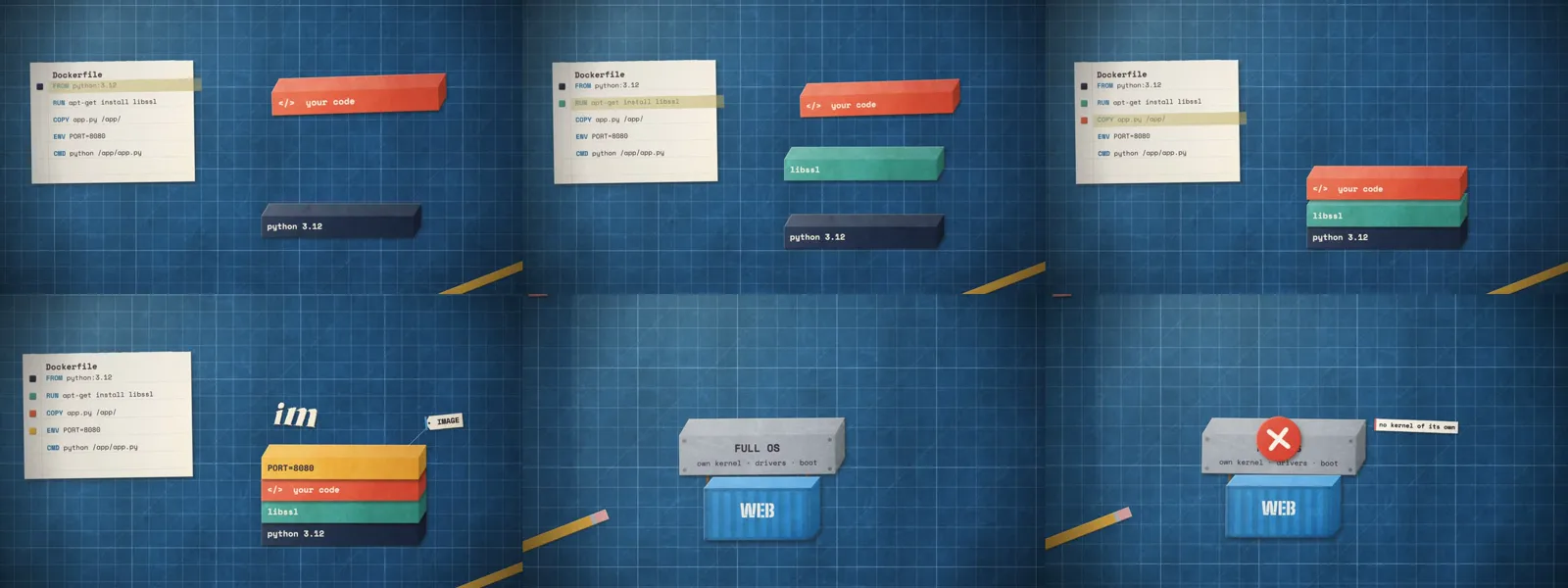
A small script renders the film at any list of times and tiles the frames into
one image, render/sheet.jpg. After each scene file, the model rendered a sheet
and looked at it. Five rounds of that produced fixes I would have made myself.
The developer was too small at the desk, so it scaled the figure from 2.5 to
3.2. The layer tags ran off the right edge, so it moved the layer stack left.
Container doors overlapped their neighbors, so it opened them 60% instead of all
the way. The registry laptop was the wrong size, so it drew a smaller one and
added a “my laptop” tag. It swapped a desk lamp for a pencil cup, raised the
whale on the end card, and made the spout bigger. One tag said “starts in ~1 s”,
which it changed to “starts in seconds” to match the narration.
Checking every word
Every narration take went through Whisper before it was used. Take 0 matched the script word for word. Take 1 said “Every developer has set it”, so it was out.
After the mix, it transcribed the final voice track to make sure no edit had clipped a word, and Whisper heard “set” again. That could mean the edit cut off the end of “said”, or that Whisper just misheard. I liked what it did next. It cut that one line out at three slightly different boundaries and transcribed each with word-level confidence. All three came back “said” with a confidence of 1.0, so the edit was fine and the full-track transcript was wrong.
Listening for clicks with arithmetic
A bad audio edit shows up as a click: a sudden jump between two neighboring samples. At each of the seven music cuts, the model measured the largest jump and compared it with the 99.9th percentile jump across the whole track. The worst cut came in at 0.0436 against a normal ceiling of 0.0498, so none of them stood out. It also measured the final mix at -15.5 LUFS with a -2 dB peak, a normal level for online video.
A second model, whose notes it checked
For the one thing no measurement could judge, the film as a whole, it shrank draft 1 to a 1.5 MB, 640-pixel copy and sent it to Gemini 3.8 Flash, which can watch and hear video. It asked for a review as “a senior animation director and re-recording mixer”: a prioritized list of real problems, with timestamps.
The review caught two genuine technical mistakes. The Dockerfile in the film copied the code before installing libraries, which is the wrong order, because every code change then reinstalls the packages and the build cache stops helping. And the film said containers carry “no OS”, which is a common myth. Containers do carry an OS user space in their base image. What they skip is their own kernel. The model fixed both: the Dockerfile and the layer animation now install libraries first, and the slab now reads “FULL OS: own kernel · drivers · boot” with a tag saying “no kernel of its own”. It also took three audio notes: a harsh buzz under “breaks”, music that came back too abruptly at 12 seconds, and ducking that pumped between sentences.
Then it pushed back on one. The reviewer said the music dropped to “near-total silence” between 7.5 and 12 seconds. The model measured the level of every section, found that stretch at the same level as the rest, and called the note inaccurate. The same numbers showed the whole score sitting low under the voice, so it raised the music by 1.5 dB anyway.
I think this is the most useful habit in the whole session. It used a second model for judgment, but it didn’t take the second model’s word for anything it could measure.
Testing what it was going to hand me
After the final encode, it didn’t stop at the PNG frames it had rendered. It
pulled four frames out of the finished MP4 and looked at those, which checks the
encode itself. Then it opened the live index.html in headless Chrome, timed 57
frame draws, checked the audio length, clicked play, and confirmed that time was
moving. No page errors, a median frame time of 0.1 ms and a worst case of
6.2 ms (one drawing at 12 per second has 83 ms), 57.5 seconds of audio, and the
player at 1.4 seconds a moment after the click. Only after that did it write the
README and tell me it was done.
Making your own
You need Claude Code with Opus 5.5, Node.js, Google Chrome, and Python 3. On
the Node side, puppeteer-core and ffmpeg-static are the only packages. On the
Python side, it used numpy, scipy, soundfile, pyloudnorm, librosa, and
faster-whisper. You also need an OpenRouter key with a spend limit for the
voice, music, and review models. A few dollars covers several films.
The Reddit prompt worked as it was. After reading the log, this is the version I’d use now. It keeps the open brief and spells out the habits that made this run work, so you’re not relying on the model to come up with them on its own:
Create a pure JavaScript animation: a 30-60 second paper-craft stop-motion
explainer video, with narration, music, and sound effects, on the topic:
<YOUR TOPIC>.

Production value is the priority. You own the concept, script, art direction,
animation, and sound. Work autonomously until the film is done. Do not stop to
ask me questions.

Constraints:
- Draw everything in code on an HTML canvas. No image files.
- The OpenRouter API key is in .env. Never print it. Total paid spend: max $3.
- Lock the narration timeline before you animate. Animate to the voice.
- Check every narration take with local speech-to-text before you use it.
- After each scene, render stills into a contact sheet and inspect it.
- Get one review of the draft from a video-capable model. Verify each note
  before you act on it.
- Keep every earlier version. Do not delete files you did not create this session.
- Finish with a README: what the film shows, how it was made, the spend, and
  the exact commands to rebuild it.

Output: a 1920x1080 24 fps MP4, and an index.html that plays the film live.
Two of those lines come from mistakes. I pasted my API key straight into the
prompt, so it now sits in plain text in the session log, and a key like that
has to be treated as burned. Put it in .env and say so. And an agent working alone may delete
old renders while it tidies up, so tell it to keep them. You’ll want to compare
drafts.
A few other things I’d pass on. Start with 30 seconds; a short film is quicker
to check and tells you fast whether the style suits your topic. Pick a topic
with objects in it. Docker has boxes, layers, servers, and a whale, and I
suspect an abstract topic would be much harder to draw. Ask the model to keep
the paper engine in its own files, so the next film can use it. Keep the spend
cap even if you have budget to spare, because it made the model price its calls
before it made them. And open index.html before you watch the MP4. The live
page lets you scrub with the arrow keys, which is the fastest way to check
timing.
What still needs a person
The voice is an AI voice. It’s good, and it lands the comic beats, but you can tell. The model also can’t tell whether a joke is funny. Its checks catch wrong words, clicks, and bad levels, not a gag that falls flat.
The brief matters as much as the model. The style, the length, and the topic all came from the prompt, and the film is only as good as those choices.
And you still need to check the facts. The first draft got two things about Docker wrong. A second model caught them this time, but I would not count on that. Watch the final film all the way through before you post it.